uTime 4.2 is now available on the App Store for both macOS and iOS. uTime 4.2 has a lot of background changes and some front end ones too!
Here is the official change log:
What’s New:
4.2:
Multi-Platform:
When making a new timer on iPad/Mac, you will now be brought right to the modify screen to edit your newly created timer.
Fixed Issue with app crashing on launch after a background sync with iCloud
Behind the scenes update to handle app information: This will make less network calls and lead to less human error on update information
iPhone:
On iOS 13 when swiping down and changes have been made an action sheet will now ask you what you want to do with the changes. Saving will save your changes, discard will discard your changes, and Cancel will keep you in the modification screen.
iPad:
Slide to delete a timer is back! Slide on a timer to delete it from the list!
Along with this uTime 3.1 is available for Mac bringing changes to the backend information and a new delete button as the backspace key does not work on some OS X versions.
After all of the WWDC fun from yesterday I introduced uTime 3 for iOS. I am very happy to announce that right now uTime 3 is officially available to download on the iOS App Store.
The official uTime 3 changelog is massive and here it is:
3.0 The Massive Update:
iPhone:
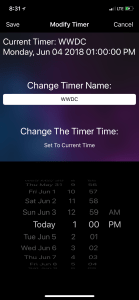
Added a new screen: Modifications. Now modifications are done in it’s own view that will slide in. It will display the name and the current target time of your timer and allow you to change it.
The timer screen has been redesigned. It now has larger text and will allow you to see the maximum amount of time remaining on the target timer
iPad:
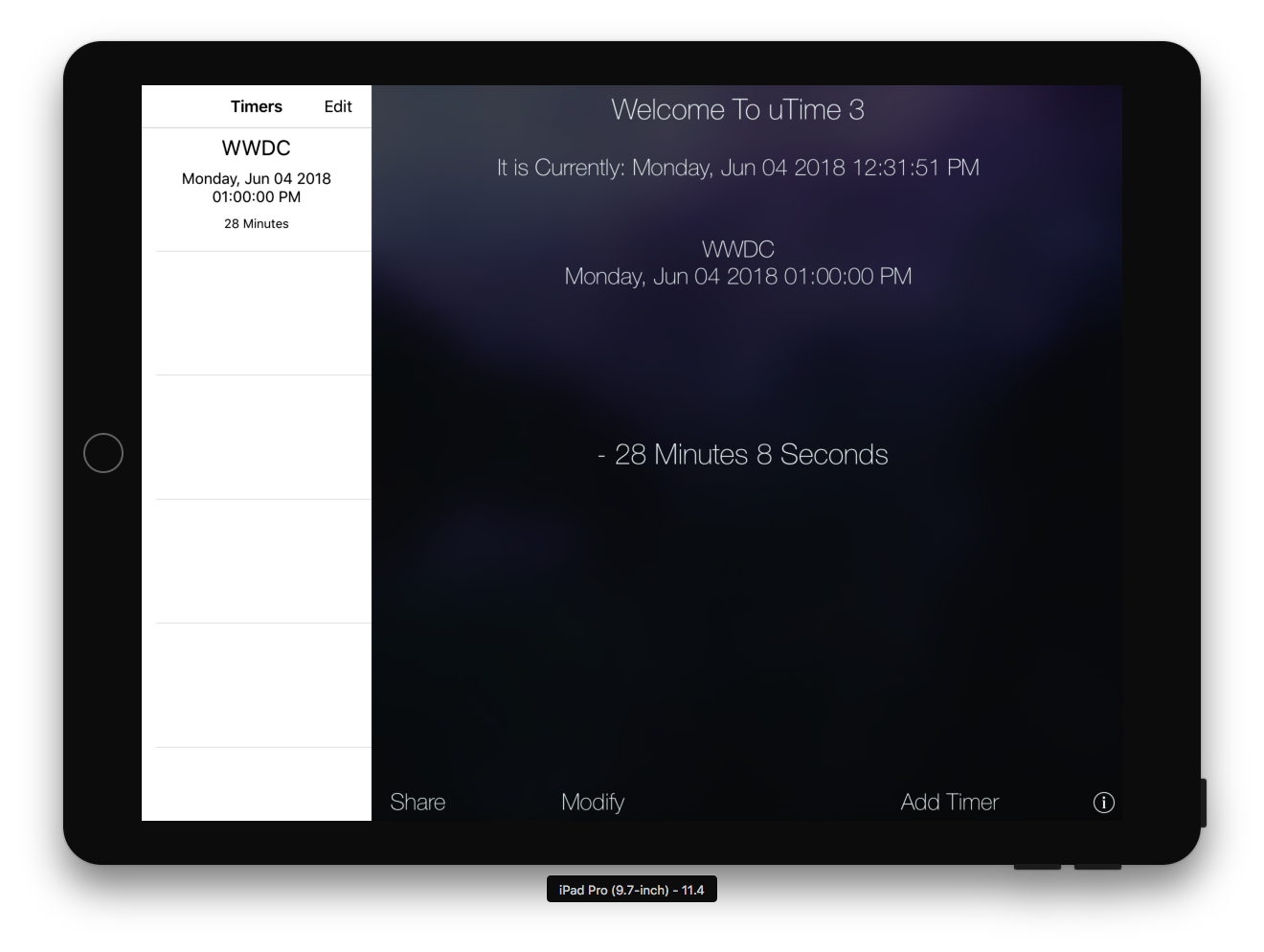
Home screen: The entire home screen has been redone. There is now the list of all your timers on the side bar along with the maximum amount of time remaining.
Modification Screen: Instead of presenting an entire screen a popup view will appear and you can modify the timer and save just by dismissing the controller (by tapping anywhere on screen). The size of the popup does not cover the current timer information so you know what you are modifying.
Web Support Is Now In It’s Own View Instead Of A Popup In The Info View
Both:
Notifications: Instead of a popup alert displaying when the timer fire date is finished a generic iOS banner will appear.
Added the ability to share the timer with various apps using share sheet. This will share the name of the timer and the maximum amount of time there is left.
Changed the background images
Support now opens in a WebKit view meaning there is a progress bar to show you the accurate loading % of the webpage.
Swift: The entire app was rewritten in swift which is why it took so long.
iOS 11: Due to the nature of the app and the newer API’s at the moment uTime 3 is iOS 11+ only.
Even though uTime 3 is 11+ only iOS 10 and below users may still download uTime 2 from the App Store.
uTime 3 is massive for iOS and I hope all of you enjoy it. As always updates will be coming throughout and due to how I set up uTime 3 they will be coming much quicker!
With all of the excitement of WWDC settling I think it is a good time to show off a project that has been about a year in the making: uTime 3 for iOS.
uTime 3 for iOS took a long time because I had to completely rewrite the entire application because of how broken uTime 2 was at the end of it’s development cycle.
The result is a uTime with much more features, much less usage on system resources, and still a fantastic app for counting down to (or from) your next date.
As seen from the screenshot above the iPad version has taken heavy inspiration from the macOS version of uTime 3 and has the timer section embedded into the homescreen.
Along with that notifications have been completely redone: Instead of annoying popups throughout the app a simple banner alert will appear to show the timer has run out of time. Along with this of course timers with an older time than the current date will not fire.
On the homescreen with timers that are being counted down a minus (-) sign will be in front of the time remaining. For timers counting forward because the date has always passed a plus (+) sign will appear.
You are now also able to share your timer with any of your share sheet apps simply by pressing share. It will popup with the name of the timer along with the maximum time remaining.
Along with all of this the way to modify timers has been redone. On the iPhone now there is a completely new view that will appear giving you information on the timer you are modifying and the same ability to modify the timer as you please as before. With the iPad this is presented as a popover view so you can still see the homscreen and information about the timer you are editing:
uTime 3 for iOS Modification Screen (iPhone)
With all of these updates and being rewritten the app should run more smoothly than ever before and bring a better user experience than ever before.
With uTime 3 some things have been removed: Sorting timers by date have been removed due to the fact it did not work well syncing between devices. This feature will be returning in a future update. Also uTime today widget has been disabled because for some reason when I rewrote the app, Apple blockaded my access to iCloud in the today section so I have to rethink how that is done as well. This will also be returning in a future update.
There are a lot of things to look forward too especially with the addition of Siri shortcuts for app developers. I will be hard at work providing updates not only to uTime but a variety of uApps applications to get them up to date.
uTime 3 will be live on the App Store this week and I hope everyone enjoys this huge update.
After being somewhat absent for a lot of the Summer Season (in terms of being a college student anyways) I have pushed a small update to uTime. This update adds support for Apple’s new iPad Pro 10.5 inch. Within the update is also a fix for the “Today” widget that hasn’t been working for a few versions (sorry)!
While I’m not going to share details on what there is a lot of things in the pipeline coming. Just keep watching for it!