
uTime 2 for macOS Now Available

utime-icon-launch

You didn’t think I forgot about the Mac did you? Of course not! I am happy to announce that after a ton of development and testing uTime 2 for macOS is now available to download!

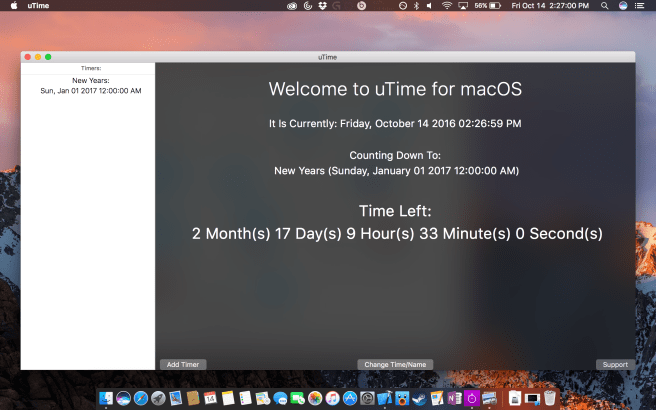
The biggest change to uTime for macOS is that I redesigned the User Interface.
screen-shot-2016-10-14-at-2-26-54-pm

As shown above our timer view is now permanantly on the side bar of our homepage! This allows quick and easy access to all of your countdown timers. To delete a timer simply select it and hit the delete key on your keyboard! Along with this for smaller screened Macs the view can be resized to better fit your screen!

Also just as a small thing I incorporated Apple’s San Fransisco font which looks very nice throughout the entire application.

Along with this a bunch of mechanics have changed including how timers are changed (a small popover instead of just appearing) along with some color changes to our info screen.

Along with this are a lot of behind the scene changes that will make uTime macOS even better!

This update took so long because I did not want to update it without iCloud syncing working on Sierra.

The full changelog for uTime 2 for macOS:

2.0:
-New Icon to match the iOS Version – Much cleaner
-Redesigned UI:
-Home screen has a new font to make it look cleaner.
-Home screen has the list of timers always visible for easy selection
-Timers are now deleted by hitting the delete key.
-The window’s width can now be resized for smaller screens.
-Change Time/Name is now it’s own view that pops up instead of just appearing.
-Support is now bigger in order to show more information and has the same black blurr as other elements.
-Adding a timer will have the name “New macOS Timer” to reflect rebranding of OSX
-Along with the new font there are multiple changes with the way text is formatted (list and home)
-Download uTime for iOS button works now.
-Changed the order of the buttons for support as closed in the middle was a little weird.
-Fixed issue where notifications would not show up when the timer was synced with iCloud.
-Support for macOS Sierra (10.12)

And here is the updated screenshot gallery for uTime macOS!

This slideshow requires JavaScript.

Outages

uApps Icon

If you have tried to load the info tabs on our iOS Apps today (settings for uSurf) you will notice that the load time for the view is very long AND doesn’t show any of our information tickers. This is due to the numerous outages along the web from DDOS attacks on servers today.

The server used for these tickers have been hit and are down so our applications are trying to load this data but cannot reach the server. Eventually the view will load if given time.

All should be back up and working sometime soon I hope but this is not something I personally control but thought I should give an explanation for why this occours.

Thank you

A Note on uTime for Mac and macOS Sierra

uTime App Icon

Back when uTime for OS X (now refered to as macOS) first came out I wrote about how iCloud syncing did not work with macOS Sierra. Shortly after this discovery I filed a bug report with Apple and now that the official release of Sierra is upon us and the feature is still broken I thought it was time for an update on the situation.

The problem is how uTime syncs arrays between devices. Without going into complex details the feature was noted by Apple as being broken and was being looked into. They did not fix it with the release of macOS Sierra which is very disappointing as it renders uTime useless if not being used alongside an iOS device.

However, with the second beta of macOS Sierra 10.12.1 the issue is fixed and iCloud syncs between devices yet again. What this means is that Apple has figured out the problem and the next update to macOS should solve the problem.

I appreciate the patience and I know this is a big problem but it is out of my control unless I want to change both the way the iOS app and macOS app work. If this problem wasn’t fixed with 10.12.1 then I would have probably start to have done.

Thank you for the patience and keep your eye out for macOS updates.

Download uTime for macOS


uTime 2 Now Available!

utime-icon-launch

With the arrival of iOS 10 tomorrow I thought it was time to step uTime up a notch! So I am very happy to announce that uTime 2 is now available on the iOS App Store!

One of the biggest things which you can find from this post is that the icon has changed a little bit. Of course it has our little stopwatch and name but the color has changed and it still is a perfect design.

However, if that was the only thing that came with version 2 than that would be a little disapointing so there are a lot of features baked into this update.

What’s New:
2 (Current):
-iOS 10 Support
-Today Widget! Now you can see how much time is left by using the today section of notification center! This keeps up to date with iCloud so everything is always up to date!
-If you have a device with 3D Touch Running iOS 10 if you force touch the uTime Icon on the home screen the widget will appear!
-Dark Mode: You can now select if you want UI Elements to be darker.
-Added animations to “change timer” sheet.
-Multiple timer deletion: You can now select multiple timers to delete all at once instead of having to swipe each one individually. Few!
-New Icon!
-Info Screen Text Improvements.

That’s right for the first time a uApps app has a widget for notification center (and if you’re running iOS 10 (which you should) on the homescreen itself).

The widget does allow you to move throughout iCloud timers and will be self updating with iCloud Timers.

I am so happy to be able to roll this out the same day iOS 10 launches and I hope all of you enjoy it.

Download uTime for iOS

uTime for OS X 1.1.2 Now Available!

uTime App Icon

uTime 1.1.2 is now being pushed to the Mac App Store. uTime 1.1.2 contains bug fixes and improvements. The official changelog is:

1.1.2:
-Added Links to download uTime in the info panel.
-Fixed error where hitting “Web Support” did nothing.
-User interface improvements

That’s all for this update. There will be much more to come to both uTime for OS X and uTime for OS X in the near future. Until then though happy downloading.

Download uTime for OS X | uTime for iOS

uTime 1.1.1 for OS X Now Available!

uTime App Icon
uTime 1.1.1 is now being pushed to the Mac App Store! Here is the official changelog:

What’s New:

Version 1.1.1(Current):

-Fixed issue where app would launch incorrectly (Blank Screen)

-Fixed issue where the change timer field was incorrect for the current timer.

-Removed web labels due to the fact they were causing more problems… Working on that fix… Check web support for info on the newest version.

So yes the labels have been removed except for what version running because it was producing terrible results and the fixes were more important than the labels. When I figure out the fix then I will add them back.

That’s it for this update. Enjoy!

Download uTime for OS X

uTime 1.2 is Now Available!

uTime App Icon

Just about one week after launching uTime 1.1 into the wild 1.2 is now available to download for your iOS device! uTime 1.2 introduces a bunch of new features to make the app look better than ever and be better for the overall user experience. The official App Store changelog follows:

What’s New:
1.2 (Current)
-Changed label for the current time to add words and months… Looks better!
-Changed countdown label to the same type of format as the current time!
-Added detail text to table views!
-Detail text follows the new formatting for dates.
-Added clear button for the naming text box.
-Added placeholder “Timer Name” for text box.
-Added capitilization for words for textfield input!

The new formatting allows it to be easier than ever to tell when your countdown date is. Along with this it also makes the app look so much neater with the new format being all around where the countdown and current time is. I hope you enjoy this update and there are many more to come.

Download uTime for iOS

uTime Support/uTime Information

uTime 1.1 Is Now Available!

uTime App Icon

uTime 1.1 is now available to download on the App Store for iPhone and iPad. uTime 1.1 adds some new features and fixes some things as well. The official changelog is:

Version 1.1:
– Added (s) to label to make it look better when there is a one in the countdown. 
- Made it so the label text will be based on the time remaining (or the count-up time too) (if 0 years then years won’t be shown)
– Made it so “Done” Keyboard Key will update the current timer name with the one just entered.
– Made it so when you add a new timer on iPad it immediately goes to the new timer.
– Made it so after adding new timer with “Add Timer” will immediately bring up the edit timer field.
– Made it so the name change field gives indication to what it actually is.
– Made it so the date picker will show the countdown date instead of the current date.
– Made it so the name field is cleared when changing the date.

– Fixed error with iPad in portrait cutting off the seconds.

uTime is available right now for free on the iOS App Store for devices running iOS 8 and newer. 

uTime Support Page, uTime Information Page 

uTime 1.0.1/1.0.2 Is Now Available

uTime App Icon

uTime 1.0.1/1.0.2 is now available… If that seems odd it is because it is. I accidentally put the current version label as 1.0.2 because Apple said I coouldn’t upload the binary with 1.0.1 but would allow the app store version to be 1.0.1 and blah blah yeah I messed that one up. However there is some bug fixes for you all!

What’s New:
Version 1.0.1/1.0.2:
-Fixed support crashing (iPhone)
-Fixed issue with iPhone 6 not showing the entire textField…
-Fixed Logo not being on the launch screen
-Fixed issue with iPhone where the text box would be blocked by the suggestions on the keyboard.
-Fixed issue with iPhone 4S and changing the time.

That’s all for right now!

Download uTime for iOS