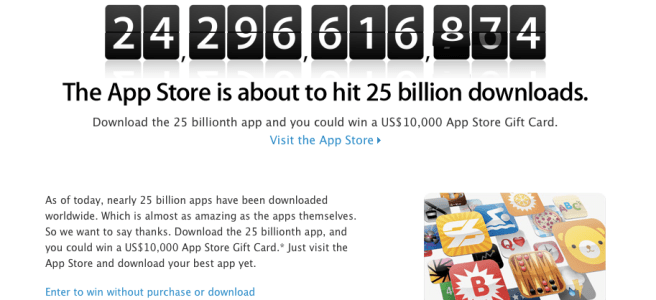
Apple Starts 25 BILLION App Downloads Countdown

It has been a big week for Apple with the announcement of OS X Mountain Lion and now Apple has posted that it is about to hit 25 BILLION App Downloads from the App store. Thats pretty good for about 4 years! You can try and win the contest in 2 ways. One you can try to download the 25 Billionth app or you could follow this link and input all the information to get selected. Please note to enter you have to be at least 13 to enter and you can only enter 25 times PER DAY. The main prize is a $10,000 gift card you can use on the iTunes store. So what are you waiting for get downloading and entering!

[Apple]

Avid Studio Is amazing!

Video Looks Better In HD!


Instead of doing a giant post on an App Review I decided to make a video of it on what I like and how to use the app! There is even stuff I don’t like! Overall though Avid studio for version 1.o works very well for video editing on the go! It is so worth the $5.

[App Store – $5.00]

How to follow the Super Bowl with your iPhone,iPad,and Mac

Superbowl Sunday is great. Unless you aren’t anywhere near a TV. That changes today. I am going to tell you how to watch the Super Bowl live using either your iPhone, your iPad, or even your mac!

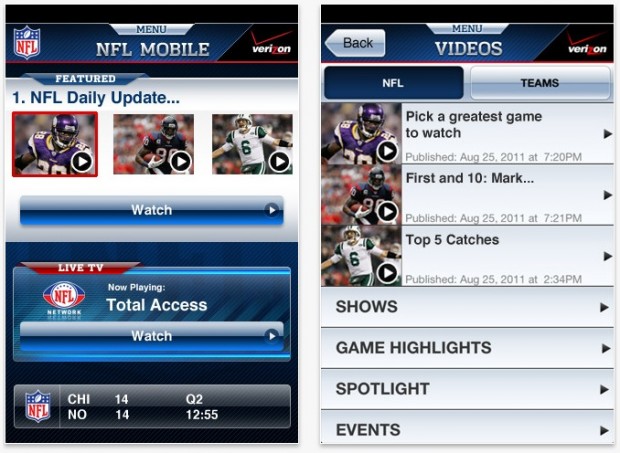
NFL Live for Verizon iPhone

If you have a Verizon iPhone you are lucky. You van get the NFL Live app for your iPhone and watch the game live. The App is universal but I don’t know if you can stream it right to your iPad so you might not want to rely on this for your iPad.

[App Store Link]

NFL.COM

This is probably a good free version to use! All you have to do is launch safari and go to the site which can be found here. Then just watch the game! This can be done from your Mac,iPhone, iPod Touch, and iPad!

[WebSite Link]

Super Bowl Commemorative App For The iPad

This one isn’t free but it gets the job done and I am guessing very well too. The app will bring you how the Patriots and The Giants made it to the super bowl, stadium shots, interviews and of course the live game. If you wanna snag this app go head!

[App Store Link- $3]

Microsoft office coming to the iPad and OS X Lion [Rumor]

The full Microsoft Office may be coming to your iPad! This would be of course to compete with Apple’s Pages, Numbers, and Keynote applications for business. It seems that Microsoft wants in some of this business. As it is rumored Microsoft is going to start offering its office suite for the iPad.

According to sources, the tech giant is actively working on adapting its popular software suite for Apple’s tablet. With the iPad making up over 80 percent of the tablet market and millions of people worldwide using Office, that could mean big bucks for the tech giant based in Redmond, Wash.

In addition to an iPad-ready version, a new edition of Office is expected for OS X Lion sometime next year. The current version of the desktop package, Office 2011, officially supports iOS versions up to Snow Leopard. A Lion version, likely available via the Mac App Store, is widely expected. Windows, too, is due for an update, with Office 2012 currently in beta form.

So in addition to the iPad getting some office love all of os running OS X lion might be getting office 2012 with Lion in the Mac App Store. All of the apps for both the iPad and the Mac should be less than Apple’s iWork app pricing.

Find My Friends Doesn’t Always Use Your Location

A lot of buzz has been going around Find my Friends the last couple of weeks and I have gotten to use the service a lot and I am going to clear up some questions you might have about it! So let’s get started.

Does it always use my location?

NO! You may think this because how else would friends find you. No it doesn’t you see what happens when a friend launches the App it requests all the locations of their friends. Then they can choose to refresh to find it again or not. It only does it for a one time thing it doesn’t always monitor where you are your friends have to request it.

how do i disable people from finding me?

You of course can always make it so people will not see where you are and it seems people forget this exists that it always is on! All you have to do is go into the app and hit the me tab on the bottom. Than you can turn on the switch to hide from your followers meaning they won’t be able to see your location!

Those are most of the things I have been seeing around the internet and people asking me about. If you have a question you would like me to answer on the site or even add to here then comment on this post, send me a message on twitter @matthewjagiela, or even on Facebook!

Airport utility is coming to an iPhone and iPad soon

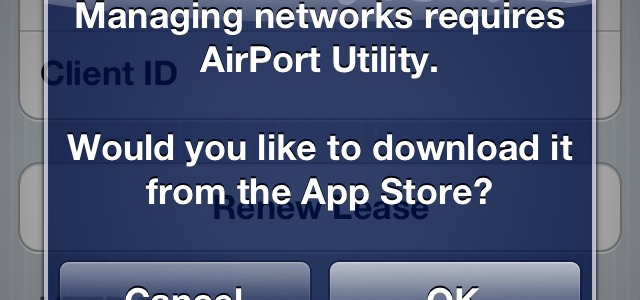
Well Apple is really making it so you do not need a computer to do really anything. Not even to set up and manage your wifi connection anymore. That’s right that little message is in the GM seed of iOS 5. All you need to do if you have the GM installed is go to settings>wifi>the arrow next to your network and then at the bottom hit manage network and then you will see the message. If you say ok then it will try to take you to the App but will fail saying the content is not available. So for everyone who justs wants an iPad or does everything from your iPhone you don’t need a computer for really anything now. Seems cool! Ill post a link whenever we get the app.

iOS 5 to be launched October 15th

20111004-231015.jpg

Today we got the date for the final release date for the iOS 5 public release and iCloud launch which both is October 5th. Now along with iOS 5 and iCloud we get some extras. Apple demoed 2 new apps coming to the app store for iOS 5. These apps are cards and pages and I will tell you about them both.
Cards
Cards is basically an app that allows you to make custom real not digital greeting cards. Hallmark just got burned. You can make them on an iOS device running iOS 5 and send them from the device! Remember this is for real cards it costs about $3 and you will get a notification when the card has shipped! The app itself is free. Sounds good for some people who like the old fashioned way of saying hello!
Find my friends
This is really cool and also will be a free download from the App store October 12th. It will allow you to see all the friends you have added and you can see your location along its your friends location on the map! You can see how that would be useful in the post below. You can also have it so you stop sharing your location at the end of the day which would be great as well. So wha do you think of the new apps for iOS and iOS 5? Also my review will be updated when I download the apps and try them out!

Facebook iPad app to be announced at Apple iPhone Event?

Mashable is reporting that Facebook’s long awaited iPad app will be announced at Apple’s upcoming event which is rumored to be october 4th. Also Facebook is reportedly revamping the iPhone app to be faster and usable and a new HTML 5 version of the mobile site. The iPad app was leaked earlier this Summer with it being in the iPhone 3.4 app and then being blocked by Facebook itself. According from a former Facebook engineer Jeff Verkoeyen says the app is ready, and Facebook is waiting to release it. The companies don’t have the best history but launching a revamped iPhone and the iPad app alongside iOS 5 and the new iPhone’s seems logical. So what is the rumored stuff for October 4th? The Next iPhone(s),iOS 5, and if the reports are true a Facebook iPad App. October will be an exciting month!

[ VIA Mashable]